
An SMS lands on a client’s phone and gets read within three minutes in the vast majority of cases. The email confirmation you sent the same morning? It may still be sitting unread long after the appointment slot has come and gone. That gap costs Swiss clinics real money, and the appointment reminder SMS vs email debate misses the point entirely. The question is not which channel wins. It is how to sequence both so the client never has a reason to forget.
Why open rates alone do not tell the full story
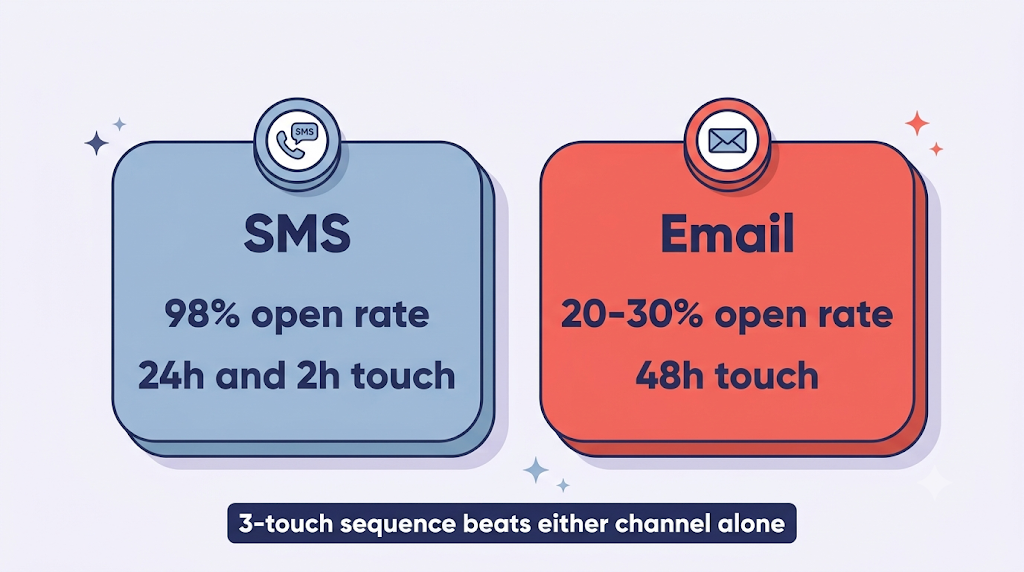
Open rates are a starting point, not a solution. SMS open rates sit at around 98% according to industry benchmarks, while email open rates across industries generally run closer to 20–30%. Those numbers look decisive, but they are not.
A message read in seconds still does not guarantee the client shows up if it arrives too early or too late. An SMS sent five days before the appointment is forgotten by Tuesday. An email sent 48 hours out gives clients the lead time to reschedule rather than simply not appear. That is a fundamentally different behavioral outcome.
The real driver of no-show reduction is not the channel. It is the moment the client is asked to confirm or take an action. Clinics that understand this stop asking « SMS or email? » and start asking « when, and in what order? »
Head-to-head: SMS vs email for vet appointment reminders
Both channels have a clear role. The mistake is treating them as substitutes.
SMS wins on speed and visibility. Messages are read within minutes, making SMS ideal for same-day or 24-hour nudges. The constraint is real: 160 characters maximum, which means you can include the pet name, appointment time, and a reschedule link, but nothing more. SMS also requires explicit opt-in under GDPR and the Swiss nDSG, so you can only send to clients who have consented at booking.
Email wins on information density and zero marginal cost. Subject lines, reschedule links, pet-specific details, pre-visit instructions, and clinic branding all fit comfortably. ezyVet’s guidance on veterinary timing windows recommends the 48-hour window as where email performs best. Clients get enough runway to act without the urgency of a same-day nudge.
Neither channel alone closes the behavioral loop. A client who reads an SMS at 8 AM the day before may still forget by 9 AM the day of. A client who ignores the email never gets the last-minute nudge that would have saved the slot. Covetrus’s reminder guide makes the same point: channel choice matters far less than having a structured cadence in place.
Curious how this works in practice?
OneClic.vet is built for Swiss vet clinics that want automated, GDPR-compliant reminders without a complex tech stack.
See how it works
The three-touch reminder sequence that reduces no-shows
The answer is not a single reminder. It is a named, repeatable cadence.Shepherd Vet’s no-show guide shows that multi-touch sequences outperform single reminders in veterinary practice contexts. Here is the three-touch sequence with the behavioral rationale for each timing window.
1. Email at 48 hours
This touch targets the planning window, when clients can still rearrange their schedule without stress. It carries the information load: visit type, prep instructions, parking details, and a clear reschedule link. It also gives your team advance warning of likely cancellations, freeing the slot for a waitlisted patient before it becomes a lost appointment.
2. SMS at 24 hours
This message arrives when the appointment is real and imminent. A short SMS asking for a one-tap confirmation or reschedule creates a behavioral commitment that is far harder to ignore than a passive email.IDEXX’s reminder article covers the 24-hour window as a high-leverage touch point for reducing missed slots.
3. SMS at 2 hours
This is the final catch for clients who confirmed but whose morning routine pushed the appointment out of mind. At two hours out, a reminder converts a would-be no-show into a client already getting in the car. It is the shortest message of the three and the one that earns its place most clearly.
Ready-to-use reminder templates for Swiss vet clinics
Here are three templates you can copy and use today, written for a Swiss clinic context with a French example to reflect the multilingual reality of the market.
Touch 1: Email (48 hours out)
Subject: Rappel RDV de Max demain: Cabinet Vétérinaire du Lac
Bonjour Sophie, nous vous rappelons que Max a un rendez-vous pour sa vaccination annuelle demain, mardi 15 juillet à 10h00 au Cabinet Vétérinaire du Lac, Lausanne. Si vous devez reporter, cliquez ici: [lien]. À bientôt.
Touch 2: SMS (24 hours out)
RDV Max demain 10h00: Cabinet Vét. du Lac. Confirmez: [lien] | Reporter: [lien]
(79 characters: well within the 160-character limit)
Touch 3: SMS (2 hours out)
Rappel: Max vous attend à 10h00 au Cabinet Vét. du Lac. À tout à l’heure!
OneClic.vet generates all three messages automatically in the client’s preferred language, French, German, or Italian, based on the language selected at booking. Your team does not write, translate, or send a single message manually.
Ready to run this sequence automatically?
OneClic.vet sets up the full three-touch cadence from booking confirmation, with multilingual messages and GDPR-compliant opt-in built in.
Book a free demo
How to set this up without a complex tech stack
You do not need a full practice management system to run this sequence. The only technical requirement is a booking platform that triggers automated SMS and email messages on appointment confirmation. No separate SMS gateway, no email marketing tool, no IT contractor.
GDPR and Swiss nDSG consent is collected at the moment the client books online. A compliant platform stores that consent automatically and only sends reminders to clients who have opted in. Woovet’s reminder guide reinforces this: the lowest-friction setup is one where consent and automation happen at the same step. Your team never manages a consent spreadsheet or worries about sending to the wrong list.
OneClic.vet’s clinic onboarding takes one to two weeks, with 15 to 30 minutes of training. The platform works alongside existing calendars, Google, Outlook, and iCal, without replacing any current software. It is designed specifically for 1–5 vet practices in Switzerland, so the workflow fits a small team rather than assuming a dedicated administrator.
What a missed appointment actually costs your clinic
A single 30-minute consultation in Switzerland is typically billed at CHF 80 to 150. At two no-shows per week, a clinic loses between CHF 8,000 and CHF 15,000 in revenue per year, before accounting for staff time spent on phone confirmations that failed to prevent the empty slot.
An empty slot that could have gone to a waitlisted patient also represents a missed clinical outcome. That dog with the ear infection waits another week. That cat’s dental check gets pushed to next month.
Automated reminders with a confirmation step convert a passive booking into an active commitment. Fewer empty slots, more revenue recovered, less admin overhead. Run your own numbers using your actual consultation rate and weekly no-show count to see how quickly the sequence pays for itself.
See the numbers for your clinic
A 20-minute conversation is enough to walk through the full setup and estimate what automated reminders could recover for your practice.
Talk to the OneClic.vet team
Frequently asked questions
When should a vet clinic send appointment reminders?
Send three reminders: email at 48 hours, SMS at 24 hours, and SMS at 2 hours before the appointment. Each timing window targets a different behavioral moment. The 48-hour email reaches clients while they can still rearrange their schedule. The 24-hour SMS creates a commitment, and the 2-hour SMS catches clients whose morning routine pushed the appointment out of mind. A single reminder is significantly less effective than a sequenced approach.
Is SMS or email better for reducing veterinary no-shows?
Both channels sequenced together outperform either channel alone. SMS reaches around 98% open rates and works best for short, time-sensitive nudges. Email sits closer to 20–30% open rates across industries but carries far more information and works well at the 48-hour planning window. The combination closes the behavioral loop that a single channel leaves open: email for detail and lead time, SMS for urgency and confirmation.
Do Swiss vet clinics need client consent to send SMS reminders?
Yes. Under both GDPR and the Swiss nDSG, SMS reminders require prior opt-in from the client. The practical solution is to collect consent at the moment the client books online. A compliant booking platform stores and applies that consent automatically, so your team never has to manage a separate consent list. This is a standard step in the booking flow, not a barrier to implementation.
Can a small clinic automate reminders without a full practice management system?
Yes. A dedicated booking platform with built-in communication tools is sufficient. You do not need a full PMS, a separate SMS gateway, or IT support. OneClic.vet is designed specifically for 1–5 vet practices in Switzerland, with no technical staff required and a setup time of one to two weeks.
What should a vet appointment reminder message include?
Every reminder needs five elements: the pet’s name, the appointment date and time, the clinic name, a confirmation option, and a reschedule link. SMS reminders should stay within 160 characters and carry only the essentials. Email reminders can add pre-visit instructions, parking details, and clinic branding. Keeping both messages transactional and specific to the individual pet significantly improves response rates.
How much revenue does a no-show cost a Swiss vet clinic?
At a typical consultation rate of CHF 80 to 150 per 30-minute slot, two no-shows per week adds up to CHF 8,000 to CHF 15,000 in lost revenue annually. That estimate does not include staff time spent on manual follow-up calls that failed to prevent the absence. Automated reminders with a confirmation step recover a meaningful share of that revenue without adding administrative work.
How long does it take to set up automated appointment reminders?
For a platform like OneClic.vet, onboarding takes one to two weeks and requires approximately 15 to 30 minutes of training. The system integrates with existing calendars such as Google, Outlook, and iCal without replacing current software. Once live, the three-touch reminder sequence runs automatically from the moment a client books, with no manual input from your team.